News

What's new in ZX-V.

New versions and news about the project, newest first. Follow it by RSS

v0.10.0Latest

Twelve sample channels, programs sent from the PC, and the board as open hardware

  • Twelve sample channels in the ULA, next to the two AY chips and the beeper: recorded sounds, 8-bit or ADPCM, in 96 KB of sound memory. From BASIC, SAMPLE plays them (LOAD "bang.wav" SAMPLE 0: SAMPLE 0); from C, the zxv_smp_* functions and the new samples example.
  • Music in its own format, .zxm, with AY tracks and sample tracks. MUSIC also loads MOD, S3M and XM as they are (it converts them when loading) and plays VGM files for the AY chips (.vgm, .vgz). zxv-music converts PT3, TurboSound, MOD, S3M and XM to .zxm: --free KB leaves room for SAMPLE, and --channels chooses which ones go from a module with more than 12 (otherwise, the 12 that play the most notes). zxv-tracker edits sample tracks and asks which channels to keep when it opens such a module. ZX Basic gets SAMPLE, .zxm and VGM too.
  • Programs from the PC to the board, over the board's UART (J5) and a 3.3 V USB-serial adapter: zxv-link (console) and zxv-link-gui (window) send a program with its files and run it. The VS Code extension runs programs on the board and debugs BASIC there. The protocol is public, so any device can do it.
  • The EXT: drive: a folder served by another computer (zxv-link serve --folder), which the machine reads and writes like the card, without copying anything to it. In zxv, File > EXT: drive; in zxv-cli and zxv-sdl, --ext; and in the browser, a folder on your PC (Chrome and Edge).
  • The board: the first ones were made and work. It is open hardware (CERN-OHL-W v2), with the KiCad design in pcb/. The firmware of both Picos now updates from the microSD card, and the date and time are set from the EDIT menu (the status line says when the clock has no time).
  • Ctrl+Alt+Del restarts the whole machine, on the board and in every emulator.
  • zxv draws with the graphics card: View > Draw with: Direct3D 11 (Windows), OpenGL or the CPU, changed on the fly. With the graphics card it uses about three and a half times less CPU in full screen. The Windows package goes from 25.6 to 16.2 MB (without the software OpenGL it did not use).
  • The web version: the EXT: drive, Paste text (Alt+V), Record the sound, and a .bas opens with LOAD like on the desktop.
  • Petit Soccer, seven-a-side football in ZX Basic, on the ROM: drive.
  • A website: cronomantic.github.io/ZX-V, with the games to play in the browser and the news. The emulator moves to /emulator.
  • The machine's sound synthesis is now public, in sdk/sound (MIT).

Downloads for v0.10.0 →

News

The first boards are here

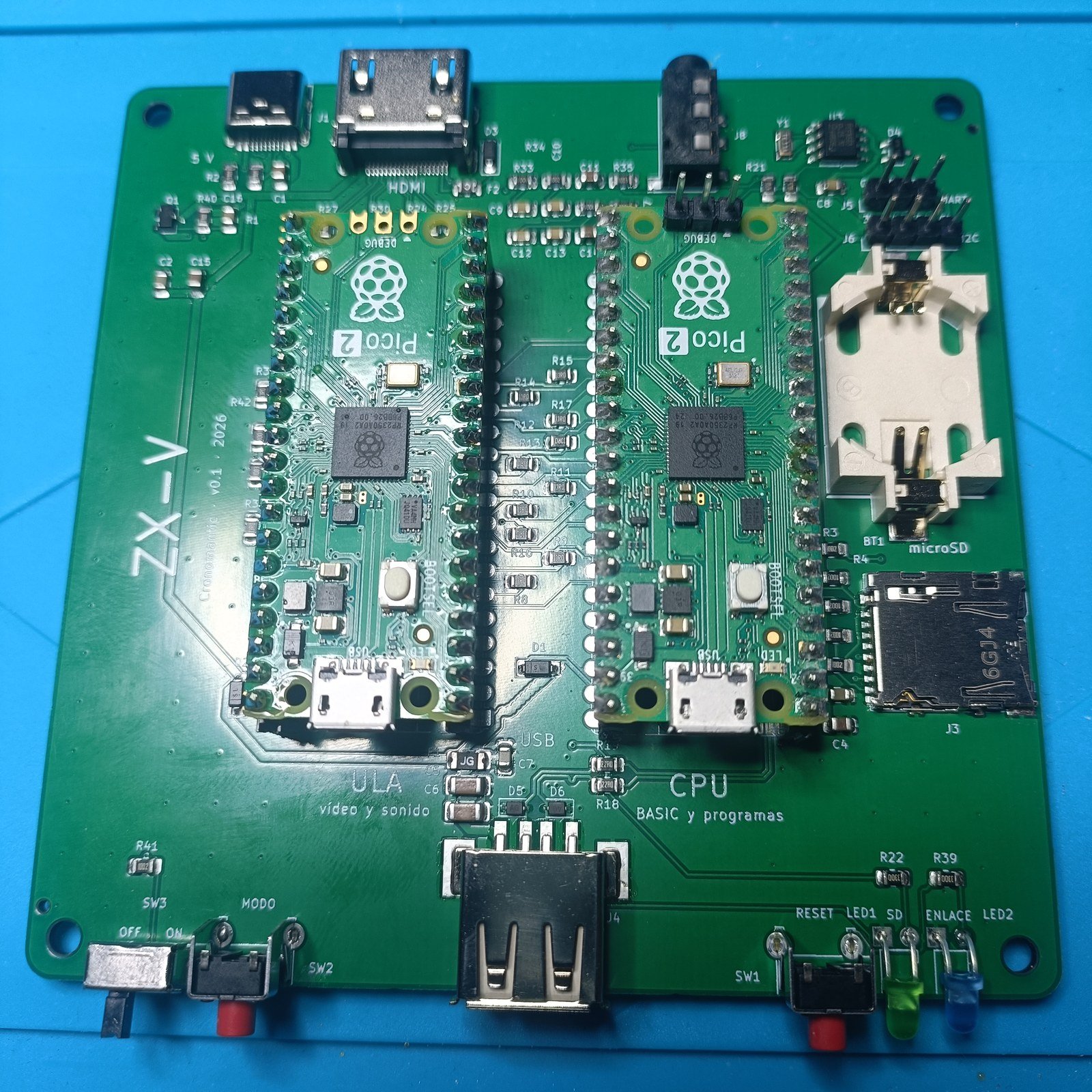
The first ZX-V boards are here. JLCPCB makes them with every small part already soldered; the two Raspberry Pi Pico 2 go in by hand (on this one, in sockets), with the buttons, the power switch and the LEDs.

The ZX-V board seen from above: the two Pico 2 in their sockets, ULA on the left and CPU on the right, with the HDMI, USB-C and audio connectors along the top edge and the clock battery holder and the microSD slot on the right

It works. With the 0.9.0 firmware the first board starts straight into BASIC on an HDMI screen, and the boardtest program on its ROM disk passes: picture and palettes, sound, the USB keyboard, the joysticks, the mouse, the MODO button and the clock. The microSD card and the clock battery are still to be tried, as soon as they arrive.

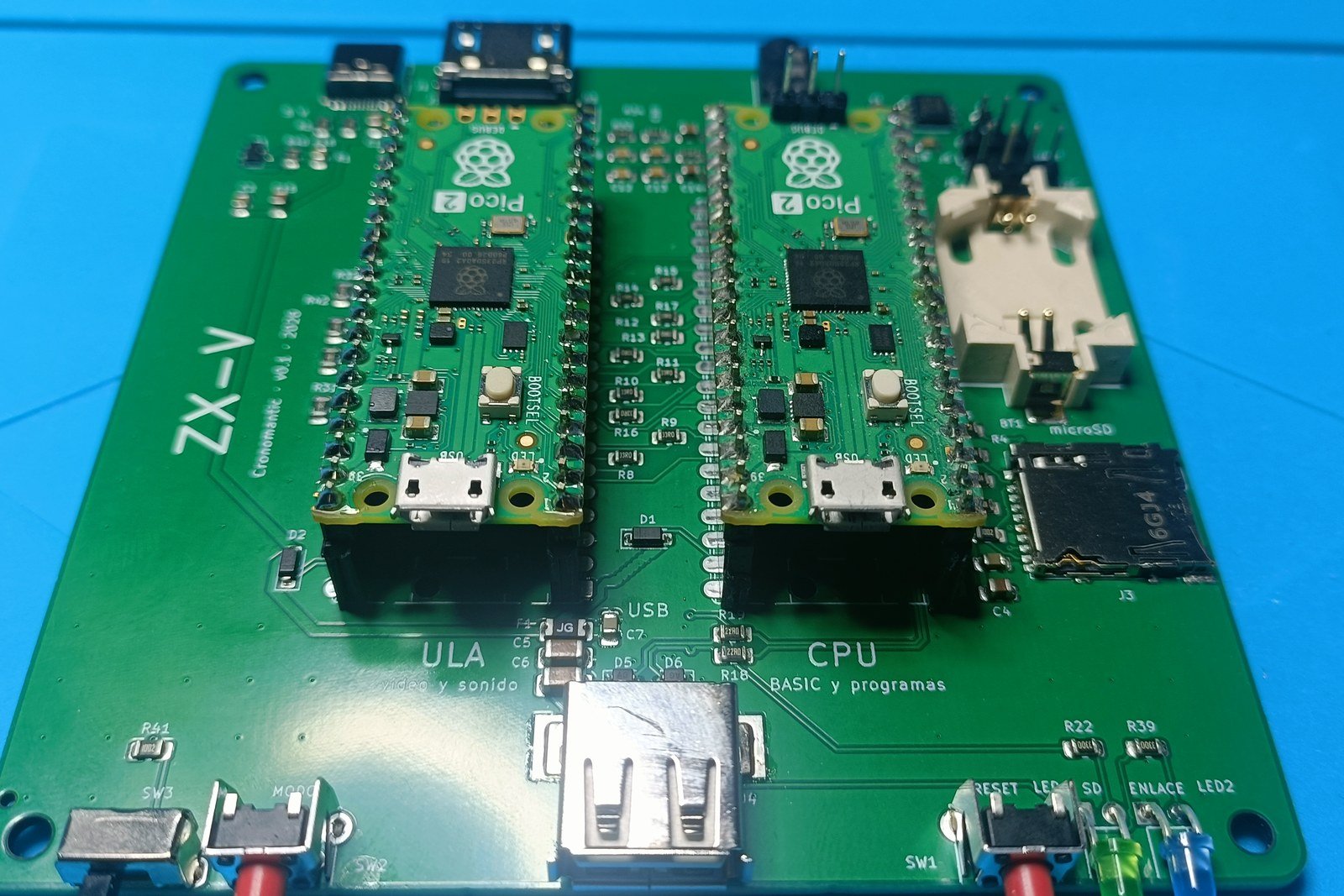
The same board from the front, slightly tilted: the power switch and the MODO button on the left, the USB-A connector in the middle, and RESET with the green and blue LEDs on the right

If you want to build one, the board guide has the files for JLCPCB, the parts list and how to fit the Picos.

v0.9.0

A key click in the editor, and borders in the games

  • The key click, as on the 128K: every key in the BASIC editor (and in INPUT and the EDIT menu) makes a short click. If it bothers you, turn it off in the EDIT menu (Tab, Key click off), and the machine remembers it: on the board in its clock, with the language (with the new CPU firmware); in zxv in its settings, and on the web in the browser. zxv-cli and zxv-sdl start without it with --no-click. Loading a snapshot keeps the setting you have now.
  • Borders in the games: black on the title screens and, while you play, the colour of each level, in The Mine, Street Justice, Route 128, Estela, The Keep, Umbra and Gone Silent. In Umbra and Gone Silent the border takes the colour of the scene, and it flashes red when you are hit, as on the Spectrum. When a game ends, BASIC's border comes back (ZXV Chess too).

Downloads for v0.9.0 →

v0.8.0

A 3D adventure, a BASIC debugger in the emulator and smoother sound on the web

  • Gone Silent (gonesilent.zxv, also on the ROM: drive): a 3D adventure in a mining colony that has gone silent. Explore the outside and four installations in your suit, read the logs the colonists left, and find the four parts your lander needs. Solid polygons with dithered shading, pixel-art creatures and items, a motion tracker, a map (M) and a saved game at the charging pads. Its source is among the SDK examples.
  • The BASIC debugger in zxv: Debug > BASIC... (Alt+B) opens a window with the program's listing, the statement about to run highlighted and breakpoints with a click; continue, stop, step into, over and out; stop on errors; the variables (arrays included), the GO SUB and PROC stack and expressions you watch. zxv also serves the VS Code extension's debugger now (--basic-debug PORT, or Debug > BASIC debugger server...), like zxv-sdl.
  • Sound on the web without breaks in Firefox: it now plays through an AudioWorklet, which rides out the pauses of a busy page.
  • Estela has a clearer status line: the ships you have left, the weapon level and the shield.

Downloads for v0.8.0 →

v0.7.2

A new game and the documentation on the web

  • ZXV Chess (chess.zxv, also on the ROM: drive): chess against the machine, at four levels, or for two players, with the keyboard, a joystick or the mouse. It was written by a contributor, and its source is among the SDK examples. Its pieces are a chess.gfx file: put another one next to the game to change them without compiling.
  • The documentation on the web, at cronomantic.github.io/ZX-V/docs, with an index on the side to move around and the next and previous pages at the bottom. The copy that comes with the emulator looks the same, and Help > Documentation in the web version opens it.

Downloads for v0.7.2 →

v0.7.1

A small update to 0.7.0

  • zxv-check --keywords gives the BASIC's keywords as JSON, taken from the ROM's own tokenizer: their codes, which ones are functions and where they are recognised. zxv-check.js in zxv-web.zip gives the same with check_keywords(), so editors such as the ZX-V extension for VS Code can follow the BASIC exactly.
  • zxv-tracker: the editor's help in English says again that Esc also stops the music.

Downloads for v0.7.1 →

v0.7.0

Colour palettes, files in ZX-V's own formats, loading screens, protected programs and a BASIC debugger

  • Palettes: each of the four colour tables now has its own palette of 16 colours out of 65,536, so a screen can show 16 colours per line and up to 64 at once. In BASIC, PALETTE colour, r, g, b; in C, ZXV_PALETTE(t) and ZXV_RGB(r, g, b). The usual 15 colours are still the default, and colour 8 is still transparent for sprites. Umbra uses them for a lamp that dims and flickers and a fog of real dark colours.
  • Files in ZX-V's formats: SAVE writes programs to .zvb (with their variables, as on the Spectrum), arrays (DATA) to .zvd and CODE to .bin, with no 64 KB limit. A .tap is for taking programs to and from Spectrum emulators; .tap files from earlier ZX-V versions still load.
  • The ZX-V screen in a file: SAVE "x" SCREEN$ saves the screen (its mode, border, palette and every pixel) as a screen in a .gfx, which zxv-gfx edits; .scr is only the Spectrum's. SAVE "x" LINE 10 SCREEN$ puts it in the program as a loading screen, and native programs can have one too (elf2zxv.py --screen, png2gfx.py --screen). A game's web page shows it while the game starts.
  • Protected programs: SAVE "x" LINE 10 PROTECT saves a program that starts by itself and is deleted when it stops, so it cannot be listed. ZX-V's tools do not show it either.
  • BASIC debugger: breakpoints, step by step, variables, arrays and the call stack, from the ZX-V extension for VS Code, with the emulator (--basic-debug PORT in zxv-sdl and zxv-cli).
  • Also: the editor's cursor blinks cyan and blue, like the +2's; boardtest has a palette page (key P) to check them on the board; and the documentation has been reviewed against the code.
  • Changes to take into account: the .zxv header now has 72 bytes: programs made with earlier versions must go through elf2zxv.py again. ZX Basic needs 1.19.0-zxv.5 (the .zxv files of zxv.4 do not load). Snapshots from 0.6 still load.

Downloads for v0.7.0 →

v0.6.2

A BASIC checker for the PC, and fixes for two of the new games

  • zxv-check checks a BASIC listing (.bas) on the PC, without the machine: it reads every line as LOAD does, with the same tokenizer and syntax check as the editor, and reports all the lines with errors (and repeated line numbers) as compilers do, with the line and column, in English or Spanish, or as JSON. It comes in the Windows, Linux and AppImage packages, and zxv-web.zip has it as zxv-check.js (WebAssembly, for Node and the browser). The ZX-V extension for VS Code uses it to mark the errors while you type.
  • Umbra: the floor and the ceiling no longer show striped, badly scaled bands when you can see far away.
  • The Keep: the doors and the brambles are now in the room you reach them from, so you can see them before you bump into them; walking into the brambles without the big sword tells you why they don't let you through.
  • Documentation: MUSIC and SFX in the BASIC's keyword index, and the ZX Basic page links to its latest release (1.19.0-zxv.4).

Downloads for v0.6.2 →

v0.6.1

Three new games, and a page to publish yours on the web

  • Three new example games, with their graphics, levels, music and effects in files you can edit with zxv-gfx and zxv-tracker: Umbra, a 3D maze in the dark in C (raycast walls, mode 7 floor and ceiling, and a lamp whose light shrinks as its oil runs out; its levels are maps in umbra.gfx); The Keep, a top-down dungeon adventure in C, four floors of rooms and a sorcerer at the top (its floors are maps in keep.gfx); and Cascade, a falling-gems puzzle in BASIC. All three are on the ROM: drive.
  • Publish your game on the web: sdk/tools/mkweb.py turns a game (.zxv, .tap, .tzx or .bas, with its files) into a page that plays only that game, ready to upload to itch.io or any website. It starts straight into the game, without the BASIC, starts it again when it ends, keeps its records in the browser, and has touch controls on phones and tablets. The page it uses is in the play/ folder of zxv-web.zip.
  • BASIC programs find their own files: a program loaded from ROM: (or another folder) looks for the files it loads in its own folder when they are not in the current one, so LOAD "ROM:platformer" now works. A file with the same name in the current folder still comes first.
  • No more overlapping texts in the C games: the "GO" arrow of Street Justice, the pause over a stage message in Estela and The Mine, Estela's boss bar, and the start banner showing through Route 128's title screen.
  • The ROM has a new system variable, EDITOR (0x2000_0724): 1 while the BASIC is waiting for a command.

Downloads for v0.6.1 →

v0.6.0

Music, sound effects and two editors to make them, and the graphics too

  • Music and effects for the AY chips: the SDK plays Pro Tracker 3 and Vortex Tracker modules, TurboSound (one module on each AY), Pro Tracker 2, Sound Tracker, ASC Sound Master and PSG dumps, and AYFX sound effects (zxv_music.h). It plays at its own 50 steps per second, exactly on time, whatever the frame rate.
  • In BASIC: MUSICLOAD, MUSICPLAY, MUSICSTOP, MUSICPAUSE, MUSICCONTINUE and the MUSIC function, and SFXLOAD, SFX, SFXSTOP and SFXPLAYING for the effects. The music plays in the background while the program goes on, and BEEP still sounds while it plays.
  • Two editors for the PC, in the Windows, Linux and AppImage packages: zxv-gfx, for the graphics files (.gfx: sprites, tiles, maps and mode 7 textures), and zxv-tracker, a tracker for PT3 music and AYFX effects that plays with the same code as the machine. In Spanish or English. And gfxedit, a graphics editor that runs on ZX-V itself.
  • Route 128 and Estela have new, longer music, one tune for each stage in Estela, and their graphics and music are now files: drop an edited .gfx or .pt3 next to the game and it uses it, with no compiling. The S key turns the music off. In Route 128 the car is no longer seen through the start arch, and the road no longer jumps at the top of a crest.
  • The SDK reads .gfx files from C (zxv_gfxfile.h), and has zxv_beeper_event_at (API 55) to put the beeper on time with the music, and zxv_music_update_until to mix the music with digitised sound.
  • The web version gets the dead keys (" then space on an international layout), the Compose key, input methods and the keyboards of touch screens.

Downloads for v0.6.0 →

v0.5.0

ZX-V now runs at 60 frames per second

ZX-V now runs at 60 frames per second, the rate of every HDMI screen, PC monitor and browser. Before, it ran at 50 and showed one frame in five twice on a 60 Hz screen.

  • What counts ZX-V frames is now 60 a second: TIME, WAIT, the frame hook, zxv_wait_vblank() and the frame counter at 0x2000_0700 (ZXV_FRAME_HZ in the SDK). A program that times things in frames runs a fifth faster: write the times with ZXV_FRAME_HZ, or in seconds.
  • What imitates the Spectrum keeps its time, in fiftieths of a second: PAUSE, FRAMES at 23672, the blinking of FLASH and of the cursor. Spectrum programs run as before.
  • The screen is 640 × 480, the same as what reaches the monitor: a border of 64 pixels at each side and 48 lines above and below. The line table has 480 entries (240 in mode 0), and RASTER goes from −48 to 431 in mode 1 (−24 to 215 in mode 0).
  • The emulator shows the border full (the whole 640 × 480), small or none. Snapshots saved by 0.4 (at 50 Hz) cannot be loaded.
  • The web version draws with WebGL, and is much faster in Firefox. The emulator is also about 15 % faster.
  • The games keep their speed in seconds. The Estela terrain and the Muncher player move one pixel per frame, so they are smoother (Muncher is a fifth quicker). Route 128 no longer loses a frame when the stage changes. The Sentry and Muncher titles are centred again (Sentry had a blue block behind its name).
  • The Pico firmware has a single picture, 640 × 480 at 60 Hz, in HDMI with sound (the default) or DVI (the safe mode). Update both Picos together: the link between them has changed. The ULA forgets the mode it had saved and starts in HDMI.

Downloads for v0.5.0 →

v0.4.1

Version 0.4.1

  • The line ZX-V shows when it starts, and after NEW, now says who holds the copyright, as the Spectrum did: © 2026 Cronomantic ZX-V 0.4.1. It used to say © 2026 ZX-V 0.4.0.

Downloads for v0.4.1 →

v0.4.0

Three new games

Three new games, on the ROM: drive and in the examples folder:

  • Muncher, a maze game in BASIC: four chasers, each hunting you in its own way, power pills, fruit, levels and a demo, at 50 frames per second with a tile map and sprites. LOAD "muncher".
  • The Mine, a digging game in C: boulders and diamonds that fall and roll, creatures that follow the walls, growing moss and twelve caves bigger than the screen, with smooth scrolling. LOAD "mine".
  • Street Justice, a street brawler in C: fighters drawn by the graphics engine from a skeleton in poses, depth, grabs and a boss in each of the three stages. LOAD "street".

The other games

  • Route 128 has manual gears, as in the arcades: Z (or button 3, or Select on a gamepad) changes between LO, which pulls hard up to about 193 km/h, and HI, which reaches 290 but hardly pulls below 120.
  • Sentry can be played without a mouse (the cursor keys or a gamepad), and Estela is easier.
  • The game help pages say O, P, Q, A, the Spectrum order.

BASIC

  • Long programs run much faster: BASIC remembers where it last found each line and each variable, instead of searching from the start every time.
  • The full-screen editor also works in mode 0: Mode 0 in the EDIT menu gives 32 × 24 double-size characters, as on the 128K.

The emulator

  • View > Border chooses how much border you see (full, medium, small or none), and View > Scaling how the picture fills the window: keeping the proportions, at an exact multiple or filling it all. The web version has both in View > Options.
  • View > Size also works with the window maximised.
  • The packages bring the documentation in HTML, to read offline: docs/index.html, or Help > Documentation.
  • Linux has an AppImage, with Qt and SDL inside: it runs on most distributions without installing anything.

Names, licences and this repository

  • Programs and folders have English names now: hello, graphics, files, boardtest, route128, sentry, platformer, rps...
  • The SDK, the examples and the documentation are in this repository: the SDK and the examples under the MIT licence, the documentation under CC BY 4.0. The binaries are free and can be passed on unchanged (TERMS.txt).
  • BASIC programs can also be compiled to native programs with ZX Basic: see Compiling BASIC.
  • The web version is also online, nothing to download: cronomantic.github.io/ZX-V.

Downloads for v0.4.0 →